
claude for business is an AI assistant that automates daily tasks like proposal writing, invoicing, content production, and customer follow-up. You don’t need to be a developer — you train it with “skills” tailored to your business.
In this guide, we show you 7 smart ways to use claude for business to save time and work smarter.
Whether you run a contracting firm with 5 employees, an accounting firm with 20 clients, or an e-commerce store with 500 products — you know the feeling: half your workday goes to emails, proposals, invoicing, and follow-ups. Claude for business takes on these tasks — so you can spend your time on what actually makes you money.
Innholdsfortegnelse
What Is Claude Code — and Why Does It Matter for Business?
Claude Code is an AI tool from Anthropic that runs directly in the terminal on your computer. Unlike ChatGPT, which lives in a browser, Claude Code has access to your files, projects, and the tools you already use.
That means claude for business can do more than just answer questions — it can actually perform tasks for you. Write a proposal based on a Notion task, check SEO data, send an email, or update a website.
The key is skills — reusable recipes that tell Claude Code exactly how to carry out a task. Think of them as digital procedures for your business.
7 smart ways to use claude for business
1. Automated proposal writing
At Nettsmed, we use claude for business to generate complete client proposals. We type /proposal in the terminal, and Claude Code:
- Pulls client information from Notion
- Structures the proposal using our template
- Calculates hours and pricing
- Publishes the proposal as a web page the client can accept digitally
Result: A proposal that used to take 2-3 hours to write is ready in 15 minutes. We still spend time reviewing and adjusting — but the groundwork is automated.
2. SEO and content production
claude for business can analyze search data, find keyword opportunities, and write complete blog posts optimized for search engines. Our /blog-writer skill:
- Pulls search data from Google Search Console
- Identifies high-value keywords
- Writes the article directly in Notion
- Optimizes for both Google and AI search engines
The article you’re reading right now? It was written with the help of a Claude Code skill. We used AI tools for business as a starting point and built on it with custom skills.
3. Customer follow-up and email
Another effective use of claude for business is customer follow-up. A skill can:
- Check for unanswered inquiries in email or CRM
- Suggest reply drafts based on context
- Send follow-up emails after meetings
- Summarize meeting notes and create tasks
For small businesses that don’t have the capacity for a dedicated account manager, this works as a digital assistant that never forgets to follow up.
4. Invoicing and time tracking
claude for business can connect to accounting systems and project management tools. At Nettsmed, we use a skill that:
- Retrieves unbilled hours from the project management tool
- Compares them with invoiced hours
- Suggests which clients should be billed
- Generates invoice drafts
Time saved: Monthly invoicing that used to take half a day now takes under an hour — including quality checks.
5. Website deployment and maintenance
For businesses with websites, claude for business can automate technical maintenance:
- Deploy updates to WordPress sites
- Check security status and update plugins
- Monitor errors via Sentry and suggest fixes
- Run weekly SEO checks
We use this daily for our clients’ custom websites — and it gives us more time to actually develop instead of just maintaining.

What Is a Claude Code Skill?
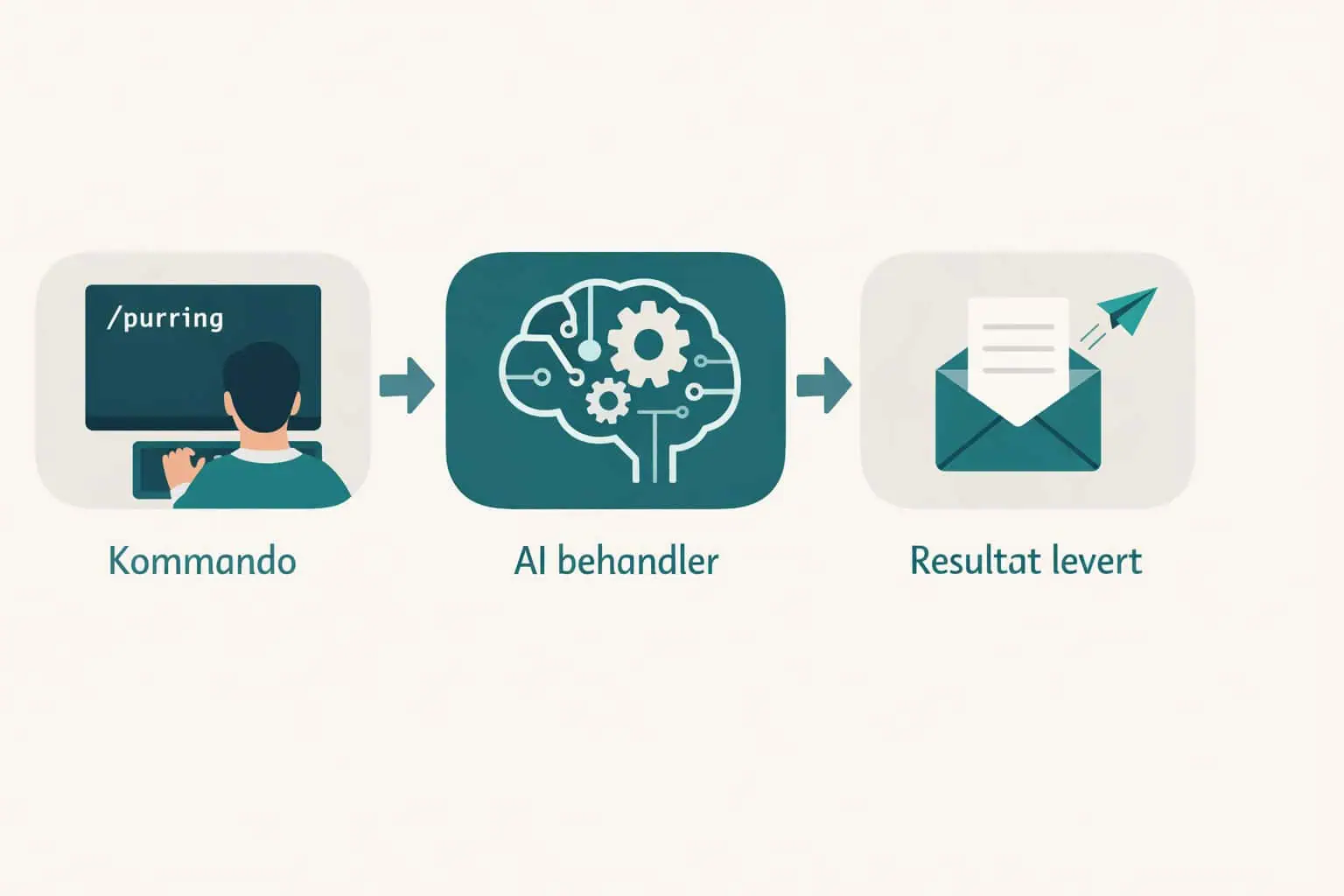
A skill is a text file that describes a task step by step. When you type a command like /proposal or /blog-writer, Claude Code reads the skill and follows the instructions.
You don’t need to know how to code to create a skill. It’s like writing a procedure for a new employee — except the recipient is an AI that can read files, search databases, and perform actions.
What a skill file looks like in practice:
A skill is a regular Markdown file (.md) that lives in your project folder. It contains three main parts: a short description of when the skill should be used, a list of steps the AI should follow, and any rules or constraints.
Here is a simplified example of a skill for an accounting firm that wants to automate payment reminders:
Skill: /reminder

Trigger: Use this when the user types /reminder

Steps:
1. Read the client list from the spreadsheet clients.xlsx
2. Filter clients where "Annual report delivered" is empty
3. For each client:
   - Get contact person and email from the client sheet
   - Write a friendly reminder based on the template in reminder-template.md
   - Show the draft for approval before sending
4. Log that the reminder was sent in the CRM

Rules:
- Never send email without user approval first
- Use the client's first name in the greeting
- Maximum 3 reminders per client per quarterCode language: HTTP (http)
There’s no special syntax or programming language. You write the instructions in plain English (or any language), and Claude Code interprets them. The more specific you are, the better the results — just like when you’re training a colleague.
Example of a simple skill:
An accounting firm can create a skill that:
- Reads the client list from a spreadsheet
- Checks which clients are missing their annual reports
- Sends a reminder via email
- Logs the event in the CRM
The entire process takes seconds instead of hours.
Claude Code Plugin and Business Knowledge
A Claude Code Plugin is a collection of skills packaged for a specific business or industry. Instead of building skills one by one, you install a plugin that gives Claude Code ready-made workflows for your type of business.
At Nettsmed, we’ve built a Claude Code Plugin with over 20 skills — from proposal writing and SEO analysis to customer follow-up and deployment. The plugin is shared among team members, so everyone has access to the same automations.
Let Claude Code learn your business
The most powerful aspect of claude for business is that it can learn from your company’s own knowledge. With an /ingest skill, you can feed Claude Code with:
- Client history and project notes
- Internal procedures and routines
- Pricing strategies and contract terms
- Technical documentation and system setups
- Meeting notes and decisions
Claude Code stores this knowledge in a structured knowledge base — a company knowledge folder that the AI reads automatically. Next time you ask Claude Code to write a proposal, it already knows what you offer, what your prices are, and what terms apply.
Think of it as hiring an employee who reads up on everything the company has done — and remembers it all for next time. The more knowledge you add, the better the results get. Over time, you build an AI assistant that knows your business as well as you do.
From solo to team
A Claude Code Plugin can be shared via Git — meaning the entire team gets access to the same skills and the same knowledge base. When one person improves a skill, everyone gets the update. This makes claude for business especially valuable for teams of 2-10 people where everyone does a bit of everything.
Picture this: a client sends an email with a question about a project. Today, you open the email, look up the client in CRM, check project status, and write a response. With claude for business, you do all of this with one command — because Claude is already connected to your systems.
Connect Claude Code to your systems
The real power of claude for business lies in its ability to navigate your entire technology stack — not just read local files. With MCP servers (Model Context Protocol), Claude Code can connect directly to:
- CRM systems — retrieve client information, update contacts, log activities (Zoho, HubSpot, Salesforce)
- Project tools — read tasks, log hours, update statuses (Notion, ClickUp)
- Accounting systems — check unpaid invoices, pull reports (QuickBooks, Xero, FreshBooks)
- Email — read, search, and suggest replies (Gmail, Apple Mail)
- Analytics — pull SEO data, traffic stats, keywords (Google Search Console, GA4, Ahrefs)
- Your browser — navigate web pages, fill out forms, take screenshots (Chrome DevTools)
A skill that connects multiple systems can, for example: fetch a new client inquiry from email, look up the client in CRM, check if they have open projects, and suggest a reply — all in one command.
Imagine you’re out on client meetings all day. While you’re away, three support requests come in, a vendor asks about an invoice status, and a new lead fills out the contact form on your website. When you get back to the office, everything has been handled — draft replies are ready, the invoice status has been checked and forwarded, and the lead has received a personalized follow-up. That’s managed agents.
Managed Agents — autonomous AI co-workers
With Claude Managed Agents, you can set up AI agents that work independently in the background — without you sitting and waiting. They run remotely in secure sandboxes, and you get notified when they’re done.
Think of them as digital co-workers with clearly defined areas of responsibility. Here are concrete examples of what managed agents can do for claude for business:
Customer service agent: An agent monitors incoming support requests. When a new ticket comes in, it looks up the client in CRM, checks previous inquiries, searches the knowledge base for answers, and writes a draft reply — ready for review. What used to take 15 minutes per ticket now takes seconds.
Prototype agent: At Nettsmed, we dispatch an agent that builds complete website prototypes. The client sends a brief, the agent generates a finished HTML prototype with our design profile, deploys it to a demo URL, and sends the link back. Everything happens automatically while we work on other things.
Monitoring agent: An agent runs daily and checks websites for security issues, outdated plugins, or performance drops. If it finds something, it creates a task in the project management tool and alerts you by email.
Reporting agent: Every Monday morning, an agent pulls the week’s key metrics from Google Analytics, Search Console, and CRM — and sends you a summary before the workday starts.
The advantage of managed agents is that they run independently of your machine. They can run on a server, at a time you specify, and handle tasks around the clock. For small businesses, this means you get the capacity of a larger team — without hiring anyone. Learn more about Claude Managed Agents from Anthropic.
| Feature | Claude Code | ChatGPT Team | GitHub Copilot | Microsoft Copilot 365 |
|---|---|---|---|---|
| Price/mo | ~$20-150 (usage-based) | ~$30/user | ~$19/user | ~$30/user |
| Access to local files | Yes | No | Code only | Via Microsoft apps |
| Customizable skills | Yes, unlimited | Limited (GPTs) | No | Limited |
| Requires programming knowledge | No | No | Yes | No |
| Can perform actions | Yes (email, deploy, API calls) | No | Code generation only | Limited |
| Multi-language support | Yes | Yes | Limited | Yes |
| Lock-in period | None | Monthly | Monthly | Annual |
ChatGPT Team is well-suited for answering questions, summarizing text, and generating ideas. But it lives in the browser and can’t do anything with your files or systems. You have to copy text in and copy results out manually.
GitHub Copilot is an excellent tool for developers writing code. For business leaders without a programming background, however, it’s not very relevant — it’s designed to help inside a code editor, not to automate business processes.
Microsoft Copilot 365 integrates tightly with Word, Excel, Outlook, and Teams. If your business already lives in the Microsoft ecosystem, it can be a good supplement. But it’s locked to Microsoft’s own apps and offers little flexibility for building custom automations.
Claude Code stands out as the only tool that combines AI understanding with the ability to act — read files, connect to APIs, send emails, and update systems. It requires a bit more setup than logging into a browser, but in return gives you far more power and flexibility.
For most SMBs looking to automate time-consuming tasks, Claude Code is the most cost-effective choice — especially when you don’t need expensive per-user licenses.
How much does claude for business cost?
claude for business starts at around $20/month for API access through Anthropic. The tool itself is free — you only pay for AI usage based on actual consumption.
For a typical SMB using claude for business for proposals, email, and content production, the monthly cost runs between $50-150 — a fraction of what you save in working hours.
There’s no lock-in period or startup cost. You can start today and stop tomorrow.
In practice, usage-based pricing means you pay more in busy periods and less in quiet ones. A month where you write many proposals and blog posts might cost $150, while a vacation month might cost under $10. For most businesses, this is far more affordable than fixed per-user licenses.
How to get started
- Install Claude Code — download it for free from claude.ai/code. Installation takes under 5 minutes and only requires a terminal (Mac has Terminal built in, Windows has PowerShell). You create an API key with Anthropic, and you’re ready to go.
- Write your first skill — start with a simple task you do frequently. Meeting follow-up is a good place to begin: write a Markdown file describing the steps for summarizing meeting notes and sending follow-ups. Don’t overthink it — start with 5-10 lines and expand over time.
- Test and iterate — a skill usually needs 2-3 iterations before it works well. Run it, see what happens, and adjust the instructions. It’s perfectly normal for the first version not to be perfect. Think of it as training a new colleague — you need to clarify expectations along the way.
- Scale — once one skill works, build more for other tasks. Most businesses start with 1-2 skills and end up with 5-10 covering proposal writing, invoicing, customer follow-up, content production, and reporting. Each new skill builds on the experience from the previous ones.
Need help setting up claude for business? We at Nettsmed offer AI consulting for businesses looking to automate their workflows.
Frequently asked questions about claude for business
Do I need to know how to code to use Claude Code?
No. claude for business requires no programming knowledge. You write skills as plain text — like a recipe the AI follows. You should be comfortable working in a terminal, but it only takes minutes to learn.
Is my data safe with Claude Code?
Claude Code runs locally on your machine. Your files are only sent to Anthropic’s servers when the AI needs to analyze them, and Anthropic does not store customer data for training. You control what Claude Code has access to.
What’s the difference between Claude Code and ChatGPT?
ChatGPT lives in the browser and can only answer questions. claude for business runs on your machine and can read files, run commands, and perform actions — like sending emails, updating websites, or generating documents.
Can Claude Code replace employees?
No — claude for business doesn’t replace people, but removes repetitive tasks. The result is that you and your team spend more time on what actually requires human judgment, creativity, and client interaction.
Ready to automate?
claude for business isn’t science fiction — it’s a tool you can start using today. Begin with one task, build one skill, and see how much time you save.
Want help getting started? Get in touch with Nettsmed — we help businesses build custom AI solutions that actually work.